Tuesday, May 7, 2013

A Treasure From the Technology Inventory


One of the most interesting technologies I found during the technology inventory assignment was a comic-book generator. This tool allows for the integration of art in an English classroom with minimal artistic skills required. The use of a comic-book generator allows students to tell a story through images in a manner that is much easier and less time-consuming or messy than actually drawing the pictures by hand. This could be very valuable in a classroom equipped with computers as students could create their stories much faster than they could by hand with conventional paper and pencils. This tool does have its drawbacks as most free generators have limited options which could limit student creativity, but it can be useful for promoting art in a quick class exercise. 

Examples of Comic Book generators:

Teaching with Tumblr


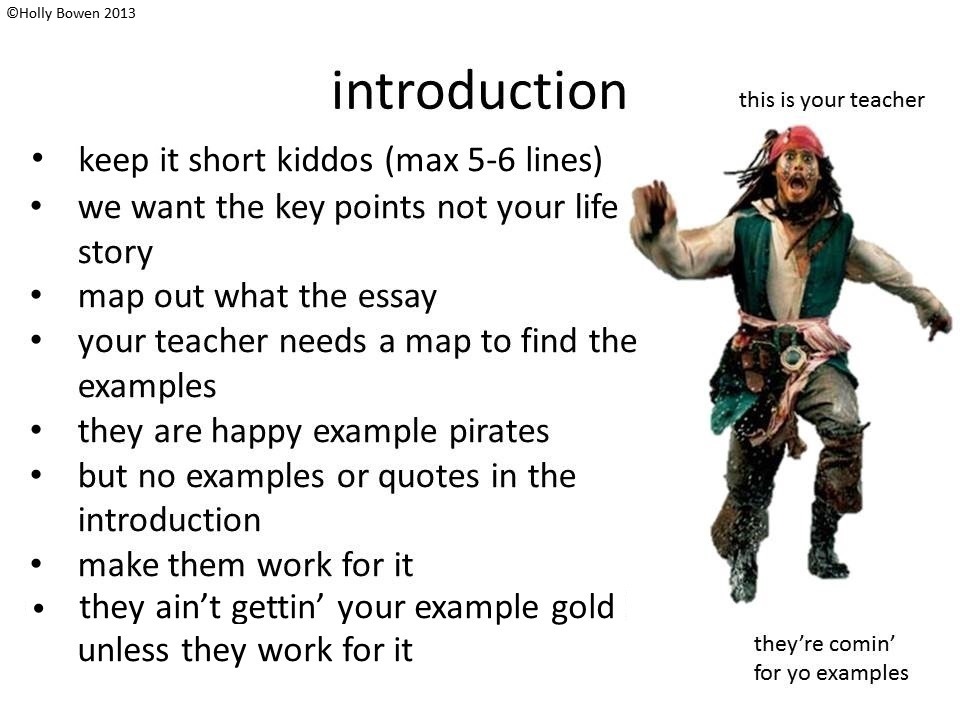
              Internet memes are often entertaining, but could they be educational as well? I recently came across a post on social media site tumblr that indicates that they can be. The post (which can be found here) follows the format of the “What I Know About X” meme, which is basically a low quality, mock powerpoint that explains a topic that the author usually knows almost nothing about.
This post, however, actually contains useful information on the very basic format of an essay. Most notably, the post compares textual evidence/examples/quotations to gold and a teacher to a pirate looking for that “example gold”. It’s even complete with the visual representation of a screaming and running Captain Jack Sparrow with the caption “this is your teacher. They’re comin’ for yo examples.”  This visual aid references the popular franchise Pirates of the Caribbean that is sure to grab students’ attention while relating the important concept of including textual evidence in their essays.
                Although I feel that this post would be an excellent aid in explaining the basic components of an essay to students in a way that is meaningful to them, there is one major issue: language. Despite this post being the “clean version” compared to the original, the slideshow includes a few choice words that I would revise before utilizing this presentation in a classroom setting. But once the language is cleared up a bit more, I think this joke of a powerpoint has the potential to be a useful guide for promoting references in a way that would appeal to students.
Using this presentation as a guide, students could also make their own presentations to teach basic concepts in a student-friendly manner that demonstrates a fair understanding of the subject. Overall, what seems like an entertaining internet meme has the potential to be transformed into an effective learning device.

Online Organizational Tools


I’m the kind of person who needs reminders and to-do lists for EVERYTHING. My desk is decorated with various colored post-it notes with all kinds of reminders and I’m starting to run out of post it notes and places to put them. This has led me in search of some online organizational tools that could be used as reminders.
As it turns out, there are a wide range of free web-based reminder services available. Most of them work by either sending a reminder by email or text message. One of the most thorough services I found was Alertful Reminders (found here). This service allows the user to customize what kind of reminder they wish to receive—Birthday, Anniversary, Meeting, Holiday, Shopping, Feed the Dog, Things to Do, etc—and the user can modify on which date to receive the reminder.  This is a tool that can be useful to both students and teachers who need to be reminded of important dates or events.
While I was looking through reminder tools, I also came across online stopwatches. This was interesting because online stopwatches have been proven to be an effective classroom tool in my Assessment class. Teachers often verbally give a time limit for a short activity, but five minutes can easily turn into ten or fifteen. With the use of a stopwatch, teachers can more effectively manage class time and keep the class on schedule.

Monday, May 6, 2013

Final Project Comments

Blogger is still being really glitchy for me and I am still unable to post comments. I did a google search on the issue and a few people have reported having the exact same problem, but no solution has been offered. One account said that he discovered his comments were automatically going into people's spam folders, but as far as I can tell there is no way to fix the problem. So here we go with the comments for the final project!

To Morgan:
I thought it was really creative of you to use Facebook as the primary tool for your lesson on characterization. Facebook is something so prevalent that this assignment is really something students can relate to and enjoy while still learning about character and perspective.

To Alex:
I remember that lesson plan from the Inclusion class! If I remember correctly, there's one version of the Three Little Pigs story on Youtube that goes beyond just reading the story out loud to including special sound effects that make the text more engaging for students. You certainly use a wide range of technological tools to reach out to students and create a more effective lesson.

To Vincent (from English Education Group 1):
I thought it was really compassionate of you to keep Han as the focus for this lesson plan adaptation as well. Your matrix is very thorough and I commend your originality on noting laser pointers as a viable technology for classroom use because it's a technology that I had forgotten about completely.


Integrating Technology Lesson Plan: The Life and Poetry of Emily Dickinson


                For the purpose of this project, I utilized the lesson plan “The Life and Poetry of Emily Dickinson” from my previous English Language Learner’s class and adapted it to include helpful technology-based tools.  The primary purpose of this lesson plan is for students to use biographical information of a poet to aid their interpretation of poetry.
                The anticipatory set consists of a picture of Emily Dickinson being presented to the class with a few verbal questions on who she is and characteristics students may know about her. On the matrix, this is represented by the standards NETS-S 1 D & NETS-1 C, which use technology to explore issues and identify trends. The questions probe students into considering the recurring characteristics of Emily Dickinson based on projected images. With the use of a projector, multiple images can be shown so that students can have a reinforced understanding of Emily Dickinson consistently being portrayed as a sad and introverted woman from the 1800s.
                The three driving curricular standards behind this lesson plan are CCSS.ELA-Literacy.RI.9-10.3, CCSS.ELA-Literacy.RL.9-10.1 and CCSS.ELA-Literacy.RL.9-10.2. RI 9-10.3 focuses on analyzing how an author unfolds their ideas or analysis, with attention paid to the connection of ideas. This is taught through the lecture connecting Dickinson’s biography to the concepts presented in her poetry that serves to illustrate that in order to fully understand and analyze a poem, it is important to understand the background of that poet because poetry tends to be reflective of the poet’s life. This brief lecture strategy is also supported by the projection of Emily Dickinson pictures, which serves to emphasize the importance of a poet in relation to their work.
                RL. 9-10.1 focuses on using textual evidence to support an analysis or interpretation. This standard is taught through a volunteer read-aloud conducted with a short  biography of Emily Dickinson. This biography provides students with a source to later be used to ground their interpretations of her poetry with background information on her life. While the original lesson plan only includes one physical handout biography, it would be useful for the students to have access to different sources. The integration of an internet-based technology such as a content manager (ex: Blackboard) or a class blog would enable the teacher to post useful links with more information on Dickinson that students could rely on as supplemental material as textual evidence to support or refute their interpretations.
                RL. 9-10.2 concentrates on identifying and analyzing the central idea or theme of a text. This is taught with a variety of strategies oriented toward the analysis of recurring characteristics of Emily Dickinson present in her work. A teacher-led modeling of reading to find characteristics shows students how to identify themes in a text. This strategy is supported with the use of a graphic organizer made with Microsoft Office smart art software that categorizes the characteristics of Emily Dickinson found in each of the 4 texts used in the lesson. This supportive technology can be used throughout the lesson as students encounter 4 different texts (the picture, the biography, and two poems). This organizer acts as a visual aid to help students identify recurring themes concerning Emily Dickinson. A second strategy used to support this standard is a guided practice read-aloud of a poem by Dickinson followed by a brief question and answer session. This practice guides students to focus on identifying the characteristics of Dickinson present in poem, encouraging students to find and analyze the themes of the poem. This strategy can be supported with the use of an audio technology to provide a more professional reading of the poem. This would support the analysis of the text by allowing students to hear the tone of the poem and feel the mood it sets.  The third strategy used to promote this standard is group work. By dividing students into groups to interpret a Dickinson poem, students will be able to continue a more indirect guided practice in which they focus on interpreting the poem through the themes of the poet’s life. To keep students oriented toward this goal, the supportive technology of a chalkboard or smart-board is used for students to share their findings with the class. This will enable the entire class to see the identifications of themes within the text.
                The original lesson plan calls for an in-depth biography and poem as a homework assignment, but I have transformed this to instead be a visual presentation of pictures or graphics that represent the characteristics of Emily Dickinson as evident in her biography and poetry with either a paper or presentation explaining how each picture symbolizes a characteristic from a text. In addition to supporting the standards RL 9-10.1 and RL 9-10.2 through the usage of textual citation and theme identification, this assignment supports NETS-S 1B by requiring students to use technology to create an original collage of images. The supporting technology for this assignment is PhotoVoice, which allows students to create a presentation of pictures that may include a voiceover, special effects, or music that opens the doors to creative expression for this standard-based assignment.

Wednesday, April 24, 2013

Comments on Interactivity 5

So Blogger has been doing this funny thing where it tells me I'm logged in until I look at another person's blog. And when I go to sign in from their blog, I'm redirected to the blogger home page and the cycle repeats itself. (And I've looked up every form of help I can think of and have been unable to find a solution.) Don't you just love it when technology glitches?

Since I am apparently incapable of commenting directly on my colleagues blogs, I will post my comments here and hope that they will see it. (And if my comments did go through and I'm just unable to view them for whatever reason, I'm sorry about the comment-spam.)

To Alex:


Your post was the first that I read and I was very surprised to see that a public school teacher was completely unaware of the technology standards. I had begun this assignment assuming that public school teachers must be aware of these standards and were probably required to implement them, but what I’ve seen so far indicates that they aren’t. It’s at least a step in the right direction for teachers to recognize the importance of technology in relation to the core standards and I thought it was really interesting for the teacher you interviewed to make that connection. 


To Morgan:
It's really interesting that even teachers who make technology a vital part of their classroom are unaware of these standards. Given that so many teachers are incorporating technology into their lesson plans, maybe they are already following the standards unwittingly. If so, that's pretty awesome. But if not, the standards should be implemented in order to ensure that students are prepared in knowing how to use technology not just for the sake of technology but as tools to aid them in creative and analytical ventures.

To Jessica:
You raise a really good point in saying that the teacher you interviewed was in a district that was not technologically advanced and so it wasn't surprising to you that he didn't know the standards. Speaking as someone who attended a high school that tried to have as much advanced technology as possible,  it's really easy to take technology for granted and assume that every school has access to the latest technology. But a lack of funding, training, or technology itself is certainly a problem for many districts. It's easy to say that schools need technology and teach students how to use it in alignment with the standards, but figuring out how to do so in an area that doesn't have the resources to support it must be a very difficult task.